No Affiliation: We are providing a redistributed/forked version of this Plugin in accordance with the GPL license. We are NOT affiliated with, sponsored by, or endorsed by WP, WC, Automattic Inc., or the original creators of this product.
Support Original Developers: We do not provide official support for the original product. If you require direct technical support, automatic updates, cloud-based features, or simply wish to support the original developers, we highly encourage you to purchase an official license.
DMCA Policy:GrootMade respects the intellectual property rights of others. If you believe your copyrighted work has been infringed upon, please submit a report via our DMCA Takedown Policy page.
Support & Discussion
Have a question, found a bug, or want to share how you’re using this Plugin? Drop a reply below!
To help us resolve your issue faster, please include:
according to official documentation we need to put a config in wp-config.php file:
define('WP_REDIS_CONFIG', [
    'token' => '<your-license-token>',
    'host' => '127.0.0.1',
    'port' => 6379,
    'database' => 0, // change for each site
    // 'prefetch' => true,
    // 'split_alloptions' => true,
    'debug' => false,
]);

define('WP_REDIS_DISABLED', false);


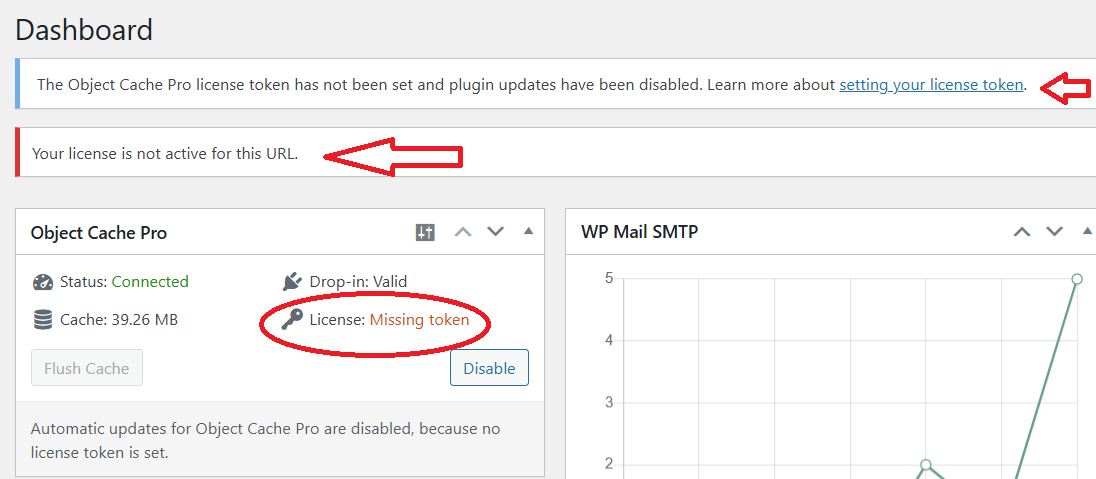
But anything i put for license token, it does not accept and says: "Your license is not active"
Thank you for the update. 50% of the problem is solved, meaning the cache is working now. But there is still the annoying license problem. It basically requires to put license token in wp-config.php file.
please refer to uploaded screenshot.
See if you could find any solution to this to show it activated and disable the warnings on WP dashboard and all pages. and bypass the wp-config license token requirement.
@Ali_Sadeqi_HostGigz Thanks for the report, The file has been replaced now. Please reinstall and ,Add the following code in your wp-config.php before installing the plugin.
 Overview
 View on GrootMade
 Product Page
 Official Website
 Disclaimer & Legal Notice
 Support & Discussion